Products
Read-only tools for online stores. Merchlint tells you what is wrong with your catalogue, on WooCommerce and on Shoper; Merchgain tells you what you earned on it. None of them writes to your store.
- Merchlint for WooCommerce — catalogue audit, free plugin
- Merchlint for Shoper — catalogue audit, app for Shoper stores
- Merchgain — profit and margin report, free plugin
- Duplicate SKU and GTIN Finder — three of Merchlint’s checks, free plugin
Merchlint for WooCommerce
Data quality auditor
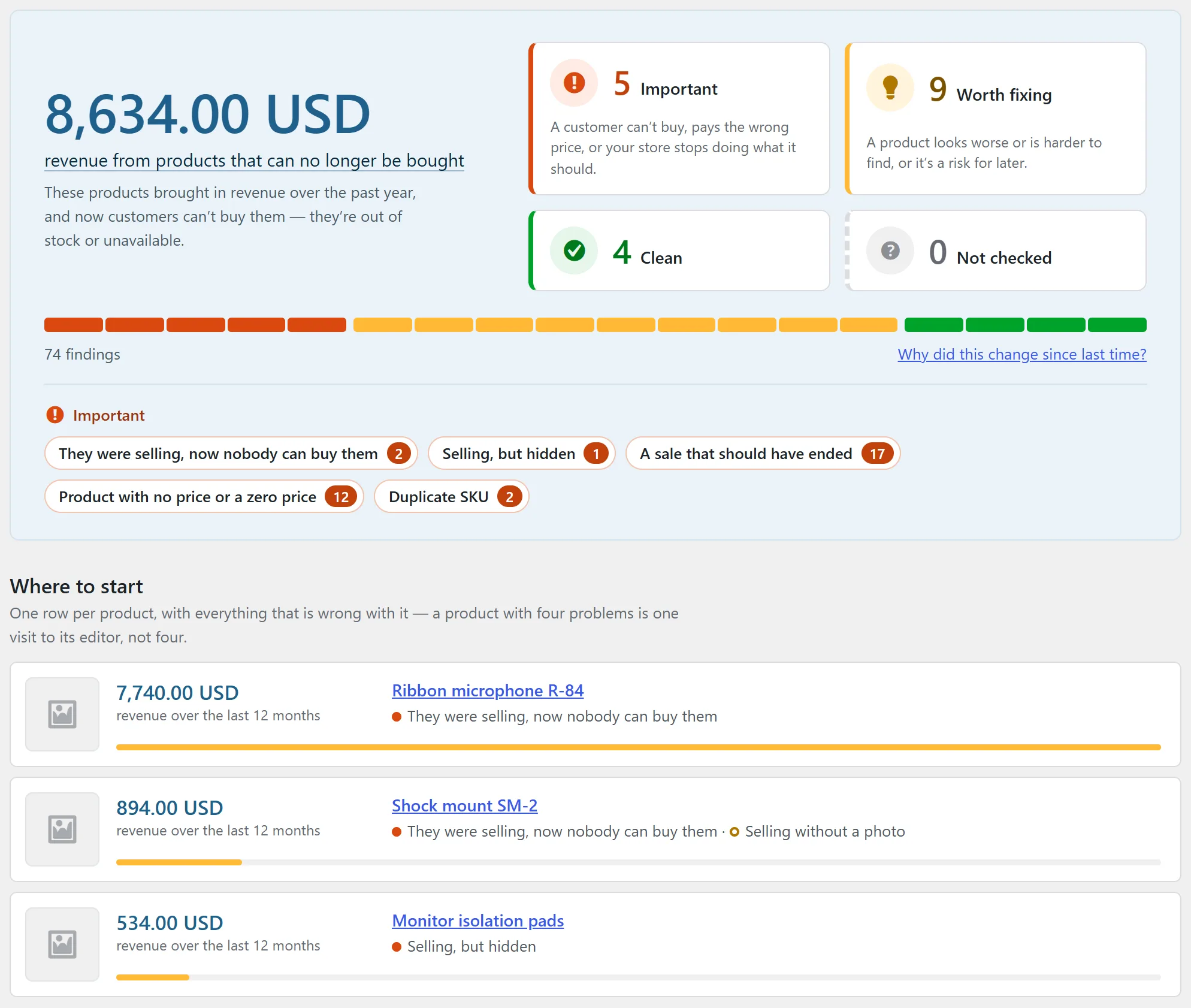
A data quality auditor for WooCommerce catalogues. It scans your products, variations, prices, media, categories and store configuration, and reports every problem it finds — ordered by what the problem is likely costing you, not by how easy it was to detect.
It scans and reports. It never modifies your store. No bulk auto-fixes, no background rewrites, no “optimisation” you did not ask for. Every change stays your decision.
Free · install from wordpress.org/plugins/merchlint · documentation at merchlint.com
What it looks for
Eighteen checks, in six groups:
- Money — products that sold in the past year and can no longer be bought; goods selling without a photo or hidden from the catalogue; sales whose end date has passed and are still running; products with no price at all.
- Catalogue and navigation — products outside every category; duplicated SKUs; variable products with every variation sold out, or marked sold out while their variations are still in stock.
- Content — descriptions too short to answer a customer’s question; images with no alternative text.
- Performance and media — oversized image files; bloated autoloaded options; media entries whose file is missing from disk.
- Environment — PHP, WordPress or WooCommerce on a version that no longer gets security fixes; a background queue that stopped running, with WP-Cron and Action Scheduler reported separately.
- Product identifiers — products with no GTIN, UPC, EAN or ISBN, and two products carrying the same one.
How it behaves
- Read-only. The audit never writes to your catalogue. This is enforced by the build, not just promised: the plugin does not ship if it calls a function that would modify products, categories, media or orders.
- Every finding shows its evidence. Not a bare count, but the field we read, the value we found and the threshold we compared it against.
- Built for real catalogues. A scan of 50 000 products takes about 90 seconds on the hardware we measure on; it runs in short slices, resumes after an interruption, and gives the same result either way.
- No false alarms by design. A zero means “checked, clean”. A rule that could not run says so instead of quietly reporting nothing. Currencies are never added together without an exchange rate.
- Honest about coverage. Every report states what was scanned, what was skipped, and why.
- Nothing leaves your server. The free version makes no outbound connections at all: no account, no sign-up, no phoning home.
Getting it
The free version is published in the WordPress plugin directory as wordpress.org/plugins/merchlint. Install it from Plugins → Add plugin in your own admin, or download the ZIP from that page. It is released under the GPL 2.0 or later; the directory page shows the current version and what changed in it.
Requirements: WordPress 6.5 or newer, PHP 7.4 or newer and an active WooCommerce installation. Tested up to WordPress 7.1. Works with HPOS on or off, and with Polylang or WPML.
A paid version with deeper checks is in development. Full documentation, the reference for every check and a Polish version live on the product site, merchlint.com.
Merchlint for Shoper
Catalogue audit for Shoper stores
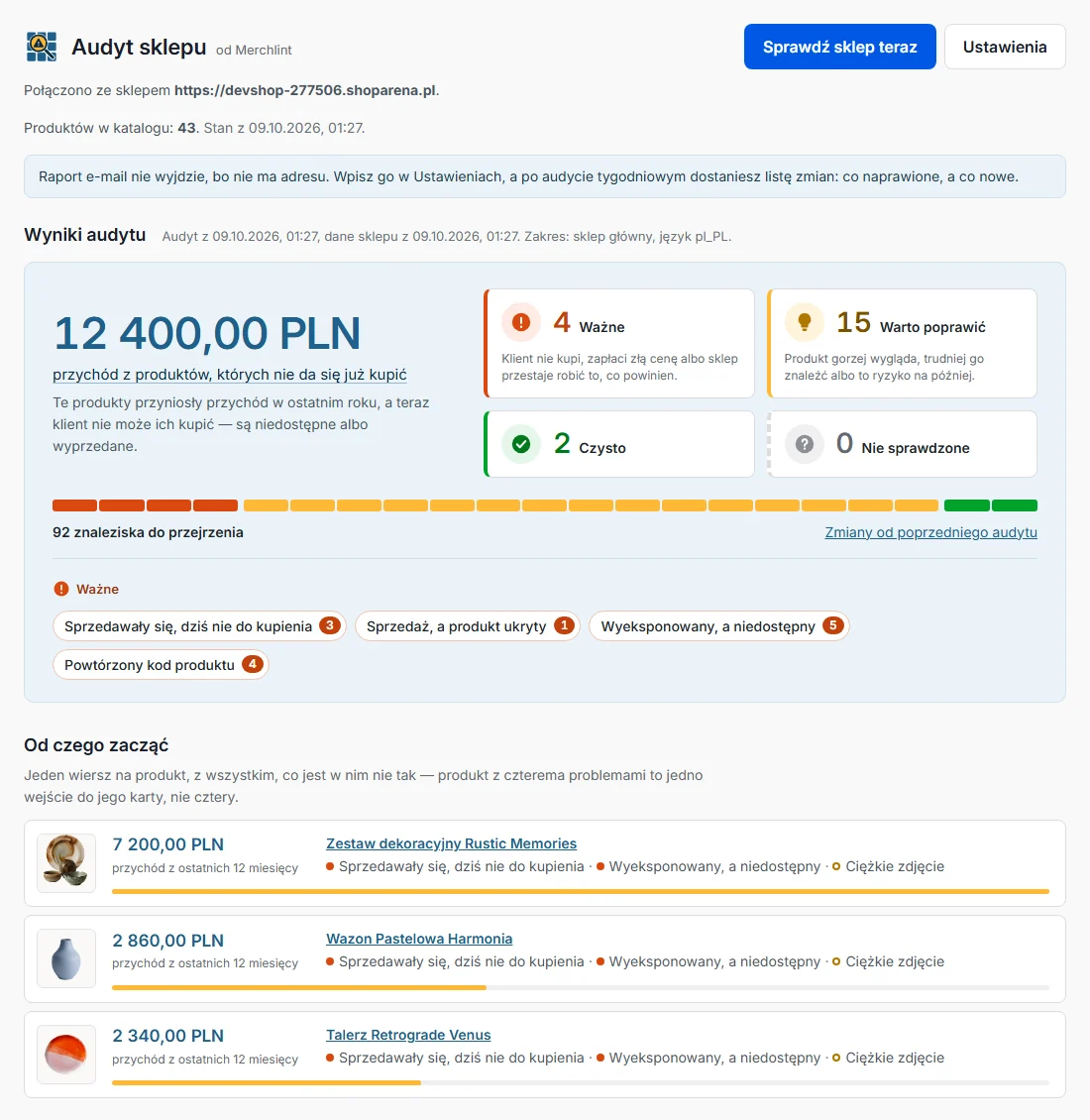
Merchlint as an app in the Shoper App Store, for stores on the Polish Shoper platform. It reads the catalogue and the sales history with read-only permissions and shows what in the catalogue is losing money, ranked by the revenue behind it. It changes nothing in the store.
The results are refreshed every night, and once a week an email lists what was fixed and what is new. The app, its documentation, terms and privacy policy are in Polish.
14 days free on first install, then a monthly subscription · install from the Shoper App Store · about the app at merchlint.com/pl/shoper
The app has its own terms and privacy policy, which say what it reads from the store, how long the data is kept and how to get it deleted. Questions about it go to contact@merchlint.com, the address given in those documents.
Merchgain for WooCommerce
Profit and margin report
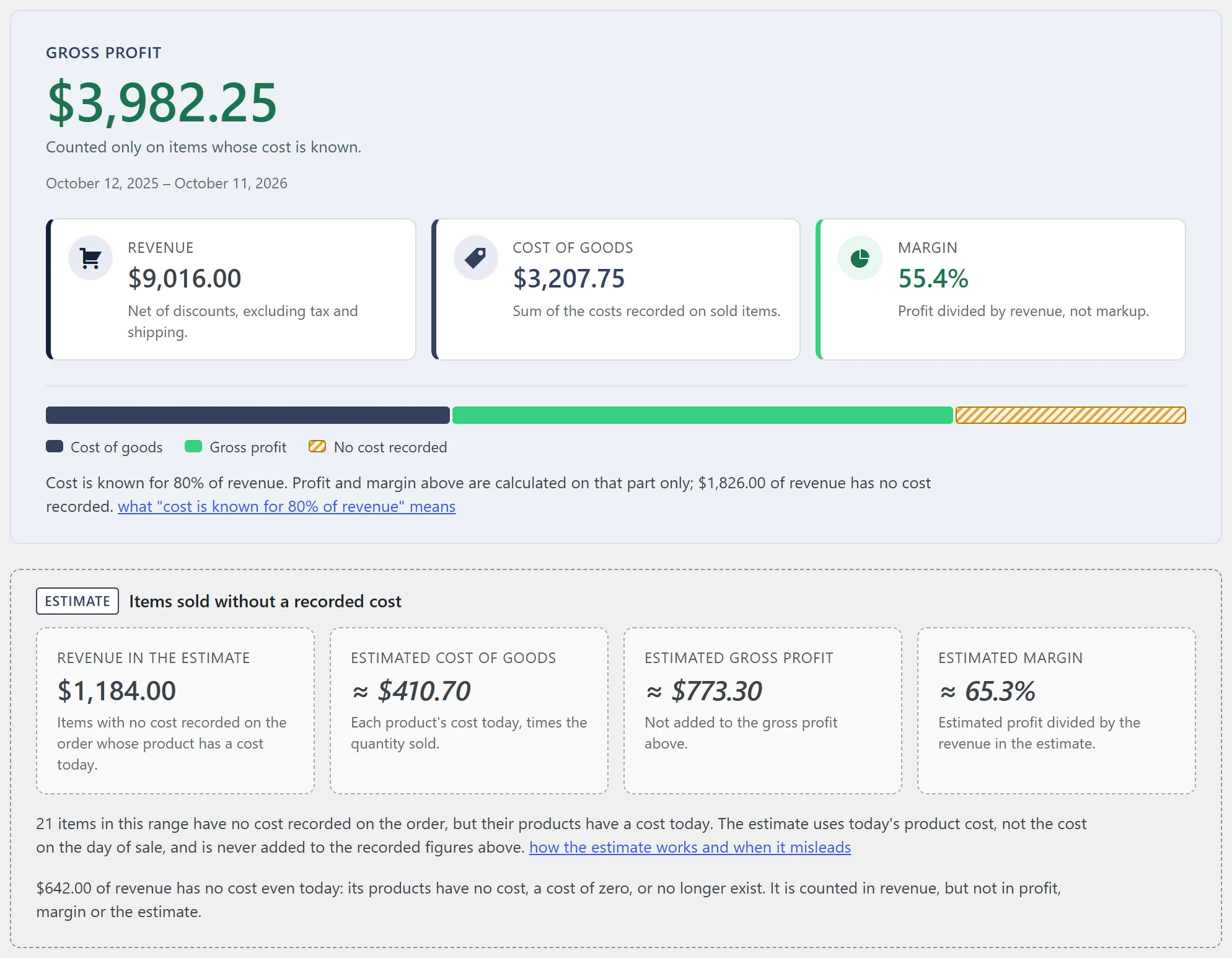
WooCommerce tells you what you sold. It does not tell you what you earned. Since WooCommerce 10.3 the cost of goods sold lives in the core product editor, and every order records the cost at the moment of sale. Merchgain reads that field and answers the question the sales report cannot: how much of this revenue is actually yours.
It only reads. No product, no price, no order and no cost value is ever written back to your store, and the report is calculated on your own hosting.
Free · install from wordpress.org/plugins/merchgain · documentation at merchgain.com
What the report gives you
- Summary cards — revenue, cost of goods, gross profit and margin for the period you pick.
- Profit per product — sortable, searchable, paginated.
- Profit per category — the same numbers grouped by product category. A product in several categories counts in each of them, so category totals can add up to more than the summary, and the screen says so.
- Missing cost warning — how many products have no cost recorded, with links straight to them, and how much of your revenue that leaves uncovered. If the cost is kept by another plugin instead, the warning says so and names it.
- Estimate for older orders — items sold before you entered costs have none recorded, so the report estimates them from each product’s cost as it is today, in a panel and columns of their own, never added to the recorded figures.
- Foreign currency warning — orders in a currency other than your store currency are named and left out, instead of being quietly added into one wrong total.
- CSV export — the current view, exactly as you see it on screen, in the free version rather than behind an upgrade.
How the numbers are calculated
This is a cost of goods sold report, so profit and margin rest on the cost recorded at the moment of sale — not on a current price list. The one exception is the estimate for items sold without a recorded cost: it uses today’s product cost, says so wherever it appears, and is never added to the recorded figures.
- Revenue is the net line total of sold items after discounts, excluding tax and shipping.
- Margin is profit divided by revenue, not markup on cost. A product bought for 60 and sold for 100 has a 40% margin here; as markup the same product would read 66.7%. That distinction is what separates a profit margin report from a sales report.
- Refunds count in the period they were issued, not in the period of the original sale, so a closed month does not change behind your back.
- Orders counted by default: completed, processing and refunded.
- A missing cost is never treated as zero. An item with no cost recorded still counts towards revenue, but it is left out of profit and margin rather than quietly inflating them — and the coverage line tells you how much revenue that is.
- Works without WooCommerce Analytics. Merchgain runs its own queries against the order tables, so the Analytics module does not have to be enabled.
- Nothing leaves your server. No account, no external service, no licence check, no telemetry.
Before you install: switch on Cost of Goods Sold
Merchgain keeps no costs of its own and does not add a second cost field to your products. It reads what WooCommerce stores, which means the store has to be storing it:
- Go to WooCommerce → Settings → Advanced → Features and switch on Cost of Goods Sold.
- Fill in the cost on your products — the field is in the General tab of the product editor.
- Open Profit & margin in the admin menu.
New orders record the product cost at the moment of sale. Orders placed before your costs were in place have none recorded, so the report estimates them from today’s product costs, separately from the recorded figures, and never as a cost of zero.
Requirements: WordPress 6.7 or newer, PHP 7.4 or newer and WooCommerce 10.3 or newer — the version that brought the cost field into core. Tested up to WordPress 7.1. Works with High-Performance Order Storage on or off.
Getting it
Merchgain is published in the WordPress plugin directory as wordpress.org/plugins/merchgain. Install it from Plugins → Add plugin in your own admin, or download the ZIP from that page. It is released under the GPL 2.0 or later.
merchgain.com carries the full documentation, the answers to the questions the report raises, a sample report and a Polish version.
Duplicate SKU and GTIN Finder
Three checks from Merchlint
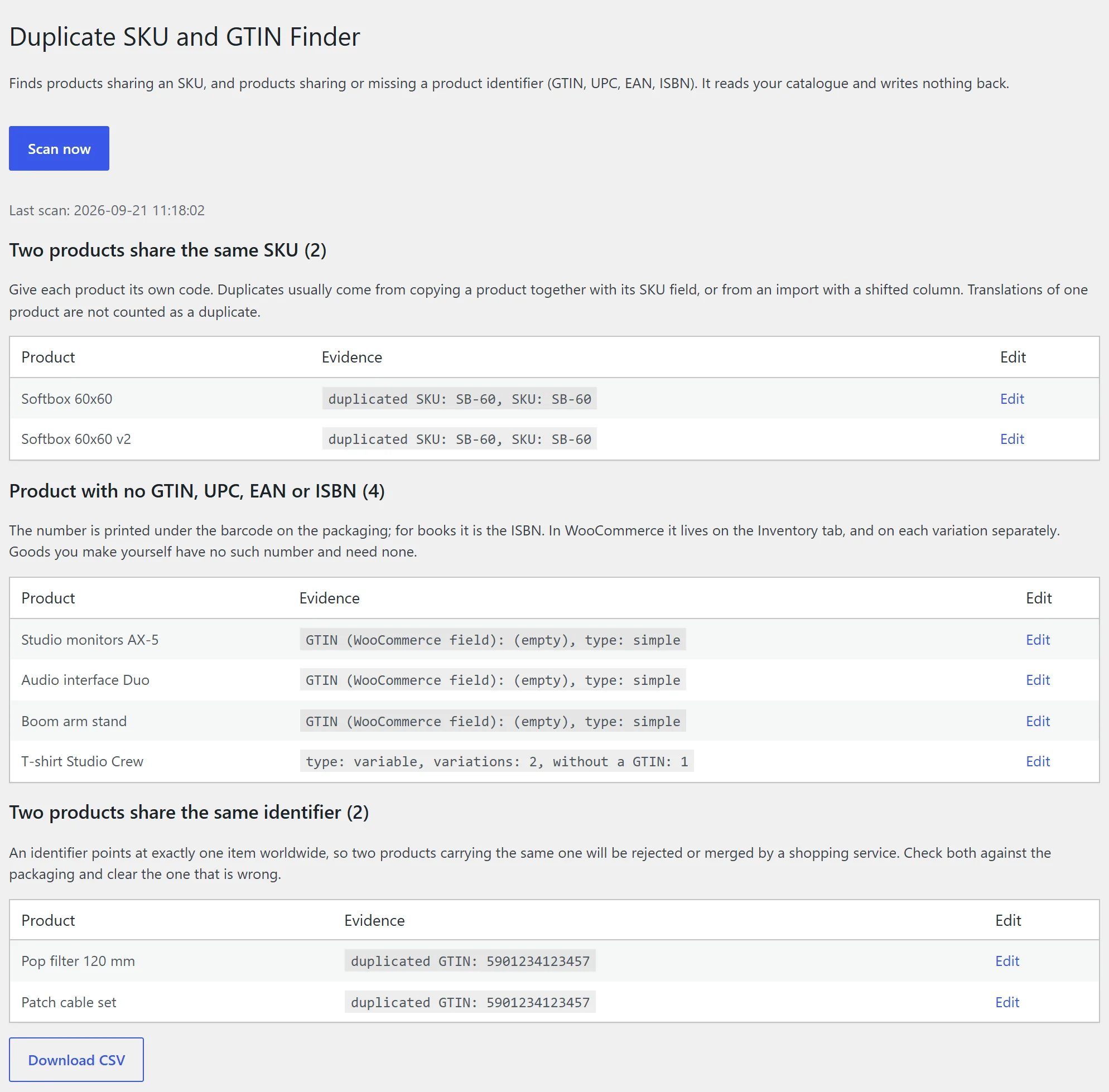
Two products with the same SKU throw off stock levels, integrations and export files. Two products with the same GTIN tell a shopping service they are the same item, so one of them drops out of search. This small plugin looks for both, and for products with no identifier at all. It never writes to your catalogue.
Free · install from wordpress.org/plugins/merchlint-duplicate-sku-finder, then open Tools → Duplicate SKU and GTIN Finder · more at merchlint.com/duplicate-sku-finder
- Two products share the same SKU. Translations of one product in Polylang or WPML are not counted as a duplicate.
- Product with no GTIN, UPC, EAN or ISBN. A store that uses no identifiers at all gets one sentence saying so, not a list of its whole catalogue.
- Two products share the same identifier.
It reads no order data, so the scan is much lighter than a full audit. The engine is the one behind Merchlint, in a copy with its own class names, so the two plugins can run side by side.
Requirements: WordPress 6.5 or newer, PHP 7.4 or newer and an active WooCommerce installation; the GTIN checks need WooCommerce 9.2 or newer, which added the identifier field. Tested up to WordPress 7.1.
Questions and problems
Bug reports and questions about the WordPress plugins go to the plugin’s own public forum on WordPress.org — Merchlint, Merchgain or the Duplicate SKU and GTIN Finder — or by email to support@baltano.com if you would rather not post in the open. For Merchlint for Shoper, write to contact@merchlint.com. Either way, see Support for what to include. Have a store you would like any of these tools tested against? We are interested — same address.